LEARN
Common Usability Testing Questions
A practical guide to usability testing questions that uncover clearer, more reliable insights.
Common Usability Testing Questions
A usability test that produces real insight versus surface-level feedback is defined by the quality of its questions. If you ask someone, “Did you find that easy?” they'll almost always say yes. But if you ask them, “What were you expecting to happen when you clicked that?”, the same participant might reveal a mental model that triggers a new onboarding flow.
This guide covers what questions to ask – and avoid – across every stage of a usability test, and how moderation choices shape the quality of the resulting insights.
Open-ended vs closed-ended usability testing questions
Most usability research is run on small samples, where depth matters more than statistical breadth.
Question type | Best used for | Example |
|---|---|---|
Open-ended | Discovery, mental models, emotional reactions, unexpected behavior | “What were you expecting to see on this page?” |
Closed-ended | Validation, quick confirmation, structured measurement | “Did you notice the search bar at the top?” |
Scale-based | Rough sentiment when paired with a follow-up | “On a scale of 1 to 5, how confident did you feel completing that task?” |
Leading questions. Asking “How frustrating was that experience?” assumes frustration and can nudge participants to agree with the framing. “How would you describe that experience?” is more neutral.
“Why” questions. People can’t always articulate why they did something. When the behavior was quick or automatic, asking “why did you do that?” can push participants to invent a rational explanation after the fact.
Instead of | Try |
|---|---|
Why did you click there? | What were you expecting to happen? |
Why didn’t you use the search bar? | Walk me through what you were looking for. |
Why was that confusing? | What part felt unclear? |
Why do you like that feature? | Tell me more about what stood out to you. |
Common screener questions
Badly screened participant pools can undermine an otherwise strong study since they aren’t actually representative of the user base. Strong screeners qualify the right people without making it obvious who the research team is recruiting.
Demographic vs behavioral screeners
Screener type | What it captures | When to use |
|---|---|---|
Demographic | Age, location, role, industry, income | When the user base is defined by who they are |
Behavioral | Recent actions, frequency, tools used, purchase history | When the user base is defined by what they do |
Attitudinal | Preferences, motivations, comfort with technology | When mindset shapes how someone uses a product |
Behavioral screeners can be more revealing than demographic ones (e.g. ”Have you booked a flight online in the past 30 days?” reflects more about a participant’s likely behavior in a travel booking test than their age and zip code).
Avoiding obvious qualification cues
A common screener mistake is making the qualifying answer obvious. A participant who wants a study incentive may say “Yes” to the screener, “Do you use project management software at work?” with options “Yes” / “No”, even if it’s false.
Use red herring options. These are plausible alternatives listed with the qualifying answer so the right choice isn’t obvious.
Bad screener | Better screener |
|---|---|
Do you watch TikTok? Yes / No | Which of the following do you use to watch short-form video? TikTok, Instagram Reels, YouTube Shorts, Snapchat Spotlight, Facebook Reels, Other |
Randomize answer choices. Participants tend to select the first option, especially when clicking through quickly. Randomization reduces this bias.
Example screener questions
For a SaaS onboarding study targeting product managers:
Which best describes your current role at work?
In the past 30 days, how often have you onboarded onto a new software tool for work?
Which of the following tools have you personally used in the past 90 days?
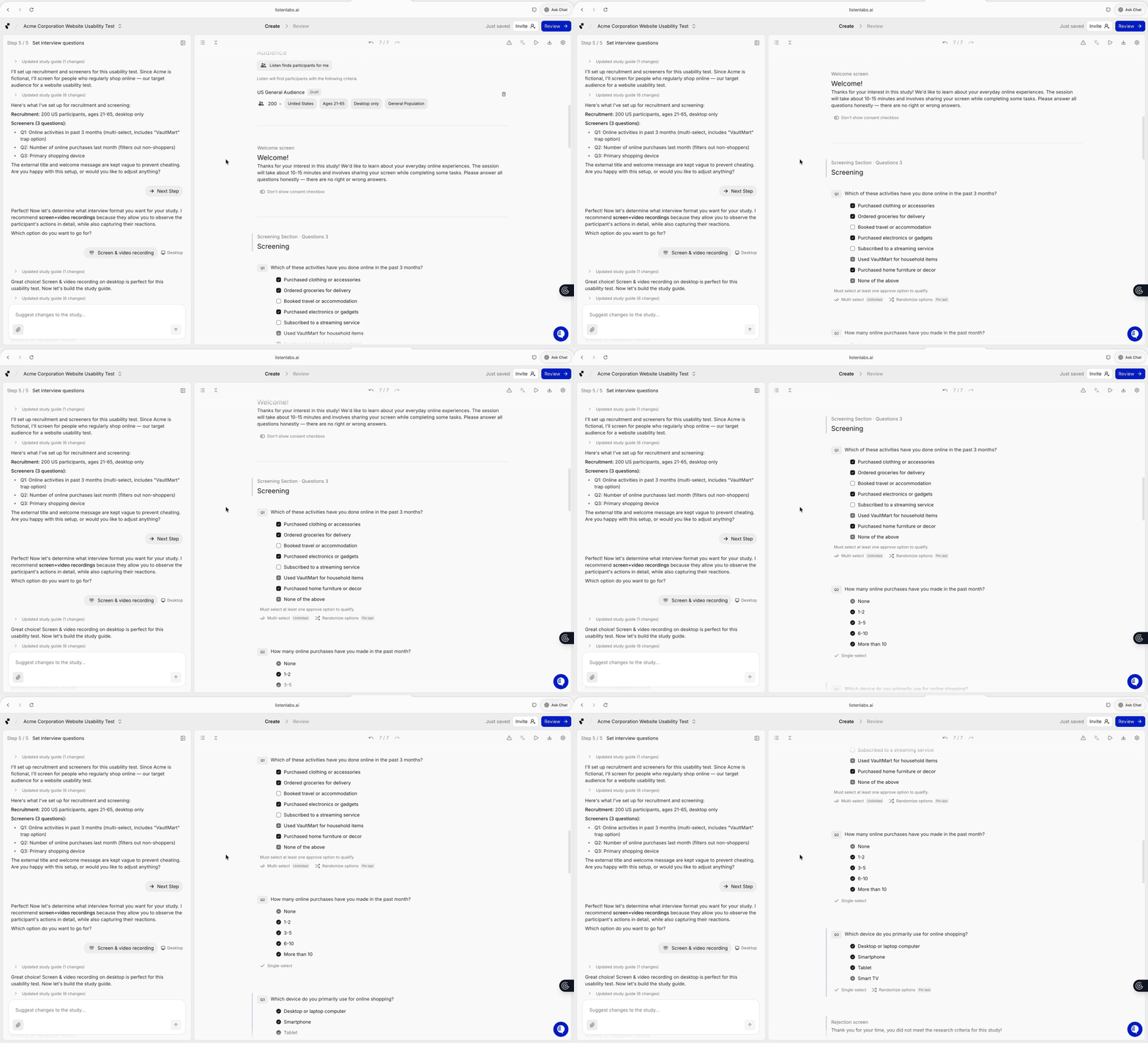
A screener setup built in Listen Labs.
Common pre-test usability testing questions
Pre-test questions establish baseline familiarity and the expectations participants bring into the session, which shape how their later behavior gets interpreted. If a participant says “I always start by searching” and then ignores the search bar three times during the task, that contradiction is worth chasing. Examples:
How familiar are you with [tool or workflow]?
How often do you perform this task in a typical week?
Walk me through your current process for [task].
When you sit down to do this task, what’s typically your goal?
Common in-test usability testing questions
In-test questions shape what gets learned. The guiding principle is to surface thinking without interrupting flow.
Testing Phase | In-Test Questions |
|---|---|
Starting a Task |
|
During a Task |
|
When Friction Appears |
|
Probing techniques that work
Technique | What it looks like | Why it works |
|---|---|---|
Allow silence | A pause from the moderator after a participant trails off | A few seconds of quiet can produce more substantive elaboration than another question would |
Mirror language | Repeating a participant’s words back without interpretation (“It feels off?”) | Encourages the participant to expand in their own terms |
Stay neutral | Avoiding defense or correction when a participant misunderstands something | Misunderstandings are useful data points, not problems to fix |
Don’t over-explain | Brief task framing like “Try to book a flight from New York to Chicago for next Friday” | More setup tends to produce more performative behavior |
Behavioral observation vs self-reported feedback
A participant completes a checkout flow and describes it as “easy.” During the task, they:
Pause for four seconds on the shipping address field
Click the “billing same as shipping” checkbox twice
Backtrack from the payment page to verify their cart
Most actions during a task are automatic. By the time the moderator asks “how was that?” the participant may have forgotten these small moments of friction.
The gap between what a participant says and does can reveal key insights.
Common follow-up usability testing questions
End-of-session questions consolidate what happened and surface things that didn’t come up during the task itself.
Evaluation Category | Follow-Up Questions |
|---|---|
Reflection and wrap-up |
|
Comparison |
|
Missed insights |
|
During a task, participants sometimes hold back observations to avoid interrupting themselves. Asking missed-insight questions gives them permission to share these thoughts at the end of the interview.
Common usability testing question mistakes
Mistake | Why it hurts | Better approach |
|---|---|---|
Leading questions | Participants take on the moderator’s framing | Use neutral phrasing |
Asking too many questions | Disrupts natural flow and behavior | Pick the moments that matter |
Interrupting mid-task | Resets the participant’s focus | Wait for natural breaks |
Over-explaining tasks | Creates artificial behavior | Give minimal context |
Unrealistic tasks | Performative rather than natural behavior | Use tasks that resemble real use cases |
Relying on self-report alone | Misses friction participants don’t notice | Combine questions with observation |
“Did that make sense?” | Implies they should agree | “What would you tell me about that step?” |
Stacking questions | The participant only answers one | One question at a time |
Moderated vs unmoderated usability testing questions
Question style changes depending on whether there’s a moderator in the room.
Dimension | Moderated | Unmoderated |
|---|---|---|
Probing | Real-time follow-ups based on behavior | Pre-written prompts only |
Question depth | Can go deeper on interesting moments | Has to anticipate what’s interesting |
Clarity required | Moderator can clarify | Questions must be unambiguous |
Flow | Conversational | Self-paced |
Best for | Discovery, complex flows, unfamiliar concepts | Validation, established flows, larger samples |
Common pitfalls | Over-probing, leading | Vague prompts, no follow-up |
Writing for moderated testing
A moderated discussion guide works as a flexible scaffold for opening conversation and following whatever threads emerge.
“Take a look at the page. Tell me what you notice.”
“Talk me through what you’d do next.”
“What’s standing out to you so far?”
The unwritten prompts often matter most. Being able to ask “what made you pause there?” in the moment is most of what a moderated session offers over a survey.
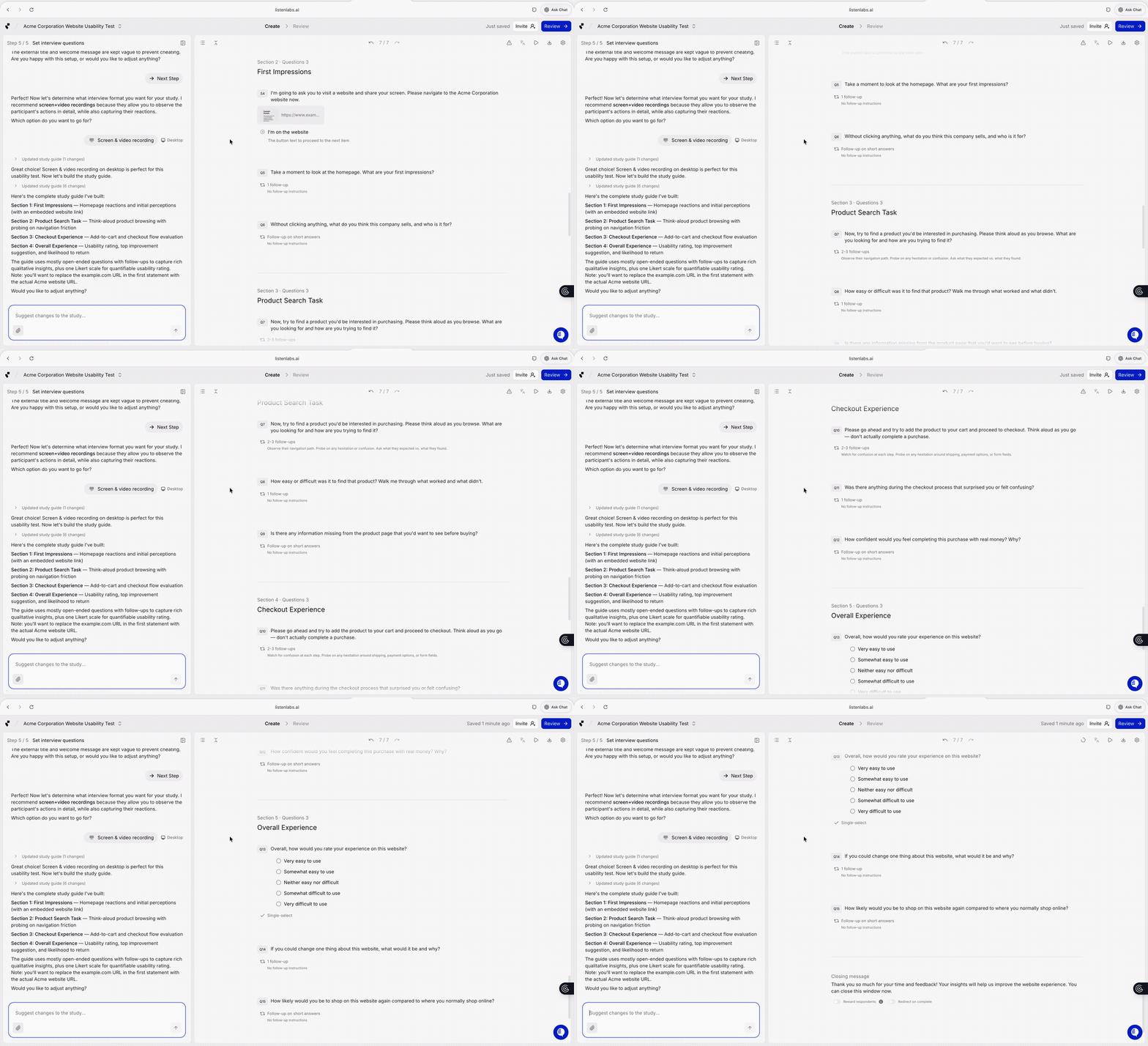
A discussion guide built in Listen Labs with structured sections, adaptive probes, and moderator instructions designed to keep sessions conversational while still producing consistent insights.
Writing for unmoderated testing
Without a moderator, every prompt has to stand on its own.
Be specific. “Try to use the product” is too vague. “Imagine you’re shopping for a winter coat under $200. Find one you’d consider buying and add it to your cart” gives the participant a real scenario.
Encourage think-aloud explicitly. “As you complete this task, describe out loud what you’re seeing, what you’re thinking, and what you expect to happen.”
Ask for honest criticism. “We’re looking for honest feedback, including things you didn’t like. There are no wrong answers.”
Add reflection questions. Without real-time probing, end with prompts that surface what would otherwise be dug into live:
Describe what just happened in your own words.
Was there any moment where you felt stuck or unsure? When?
What would you change about that experience?
Was anything confusing or unexpected?
Modern usability testing workflows
Most of the principles above have been true for decades. What’s changed is the tooling around moderation, observation, and analysis.
AI-assisted probing
Some platforms now generate follow-up questions during sessions. When a participant gives a short or surface-level answer, the platform can prompt for more depth without requiring every contingency to be scripted in advance.
Examples of where this helps:
A participant says “the pricing was weird” without elaborating. A follow-up can clarify what specifically felt weird, when they noticed it, and how it compared to their expectations.
During onboarding, a participant hesitates on a permissions prompt. A follow-up can clarify what they were weighing.
A participant abandons a flow and explains “I just wasn’t ready.” A probe can surface whether the issue was trust, pricing, or something else.
Configurable probe depth matters. Discovery studies might warrant aggressive probing on every interesting moment, while validation studies usually want a lighter touch to keep the session focused. In either case, probing shouldn’t become interrogating.
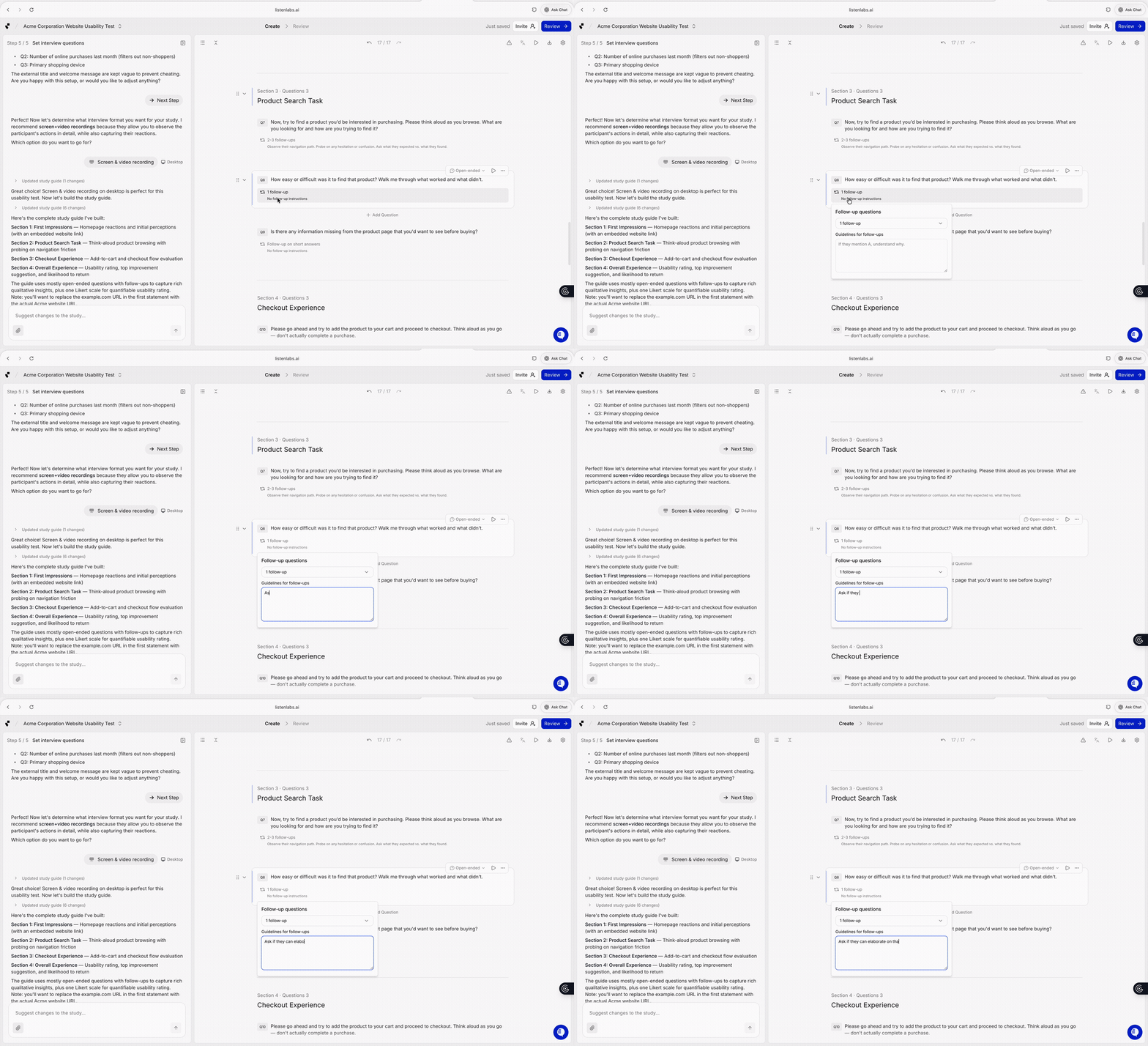
An example of how Listen Labs configures adaptive probing within a discussion guide. Researchers define follow-up topics and probe depth while the system handles real-time probes for short or unclear responses.
Emotional signals during usability testing
Transcripts capture words but can miss important nuances: hesitation before answering, tone shifts, pacing changes, the difference between an enthusiastic or flat “yes”.
Traditionally, researchers relied on live moderation or video review to catch these signals. Recent advances in multi-modal AI now make it possible to analyze tone, facial expressions, pacing, and word choice together, helping researchers identify moments of confusion, frustration, uncertainty, or delight that transcripts alone might miss.
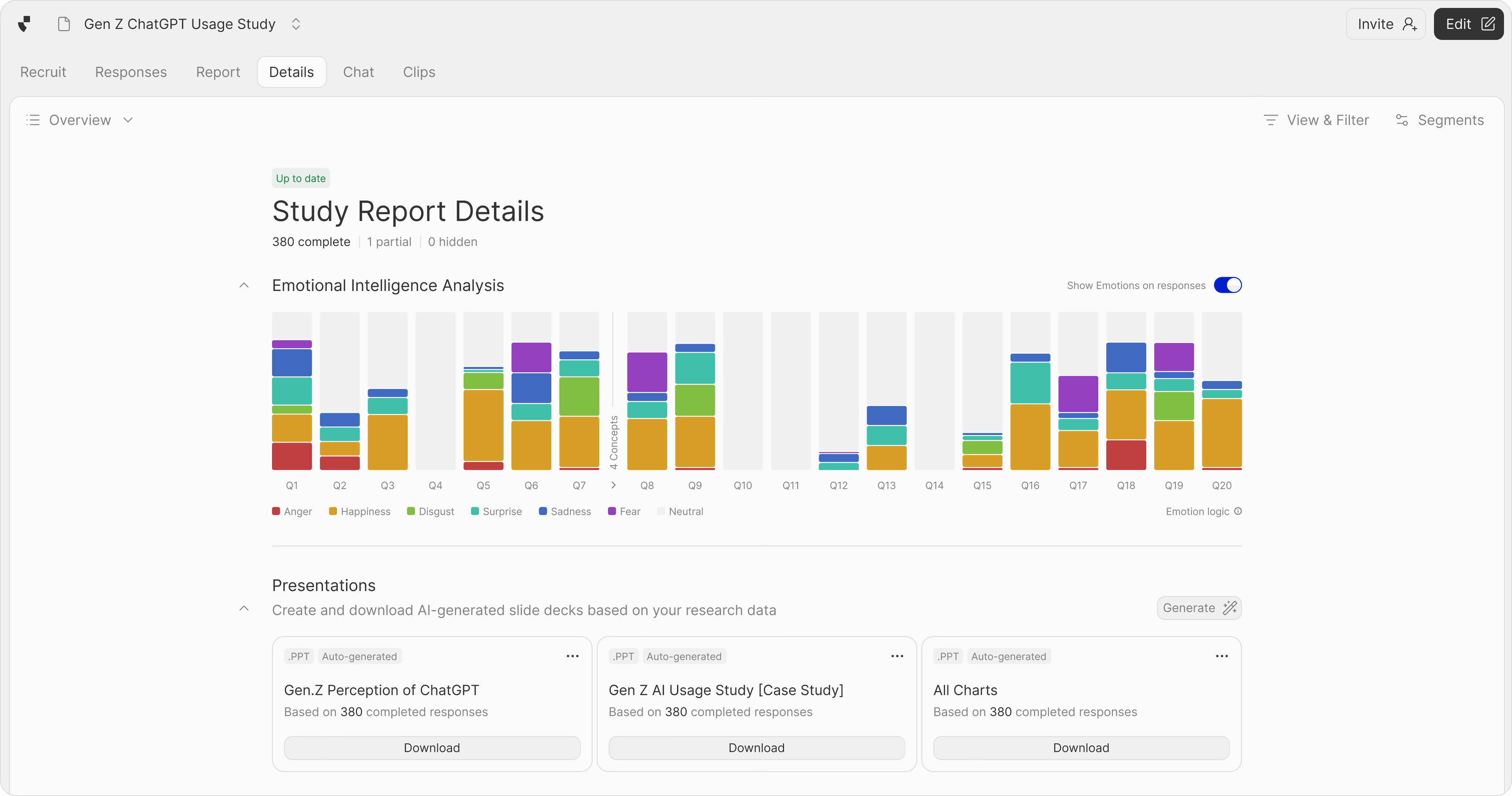
Listen surfaces emotional signals alongside the transcript to help researchers identify moments of hesitation, friction, or strong reaction during usability tests.
Conclusion
A participant who says “that was fine” while missing the primary CTA, scrolling back, or rereading labels is revealing more through their behavior than their words. The gap between what users do and what they say is often where the most valuable usability insights emerge.
Good usability testing questions move research beyond vague takeaways like “How was that?”, towards moments of hesitation, confusion, and unexpected reactions that uncover how users actually think through a product.
Modern research tools can help teams scale this kind of qualitative insight across more interviews and workflows. Listen Labs runs AI-moderated interviews across video, voice, and text, capturing behavioral and emotional signals alongside transcripts so insights stay grounded in the moments where friction, confusion, or delight actually occurred.