
Written by: Anish Rao, Head of Growth, Listen Labs | Last updated: July 16, 2026
Key Takeaways for Customer Insights Leaders
- Free AI tools like Perplexity, NotebookLM, ChatGPT, and Claude cannot source real participants, screen for fraud, or manage large-scale recruitment.
- Text-only AI misses emotional signals such as tone, micro-expressions, and hesitation that reveal what customers actually feel.
- Listen Labs delivers recruitment, moderation, analysis, and stakeholder-ready deliverables in under 24 hours with enterprise-grade compliance.
- Enterprise teams need SOC 2, GDPR, and ISO certifications plus cross-study knowledge management that generic free tools do not provide.
- Listen Labs is built for real participant interviews at scale, helping leading brands accelerate insights and decision-making.
Nine Criteria to Judge Customer Insights Tools
Evaluating any AI research assistant for customer insights works best with clear, concrete criteria. The nine that matter most are below.
- Research speed: Time from study brief to stakeholder-ready deliverable.
- Qualitative depth: Ability to capture nuance, motivation, and unexpected findings through adaptive probing.
- Participant quality and scale: Access to verified, fraud-screened respondents at volume.
- Emotional signal capture: Detection of tone, micro-expressions, and hesitation beyond transcript text.
- Analysis effort: Amount of manual work required to move from raw data to insight.
- Deliverable generation: Automated production of slide decks, highlight reels, and statistical comparisons.
- Global and multilingual reach: Consistent performance across languages, regions, and cultural contexts.
- Data governance: Compliance with GDPR, SOC 2, and ISO standards required by enterprise procurement.
- Total operational burden: Cumulative effort across recruitment, moderation, analysis, and reporting.
Study Setup and Recruitment: Where Free Tools Stop
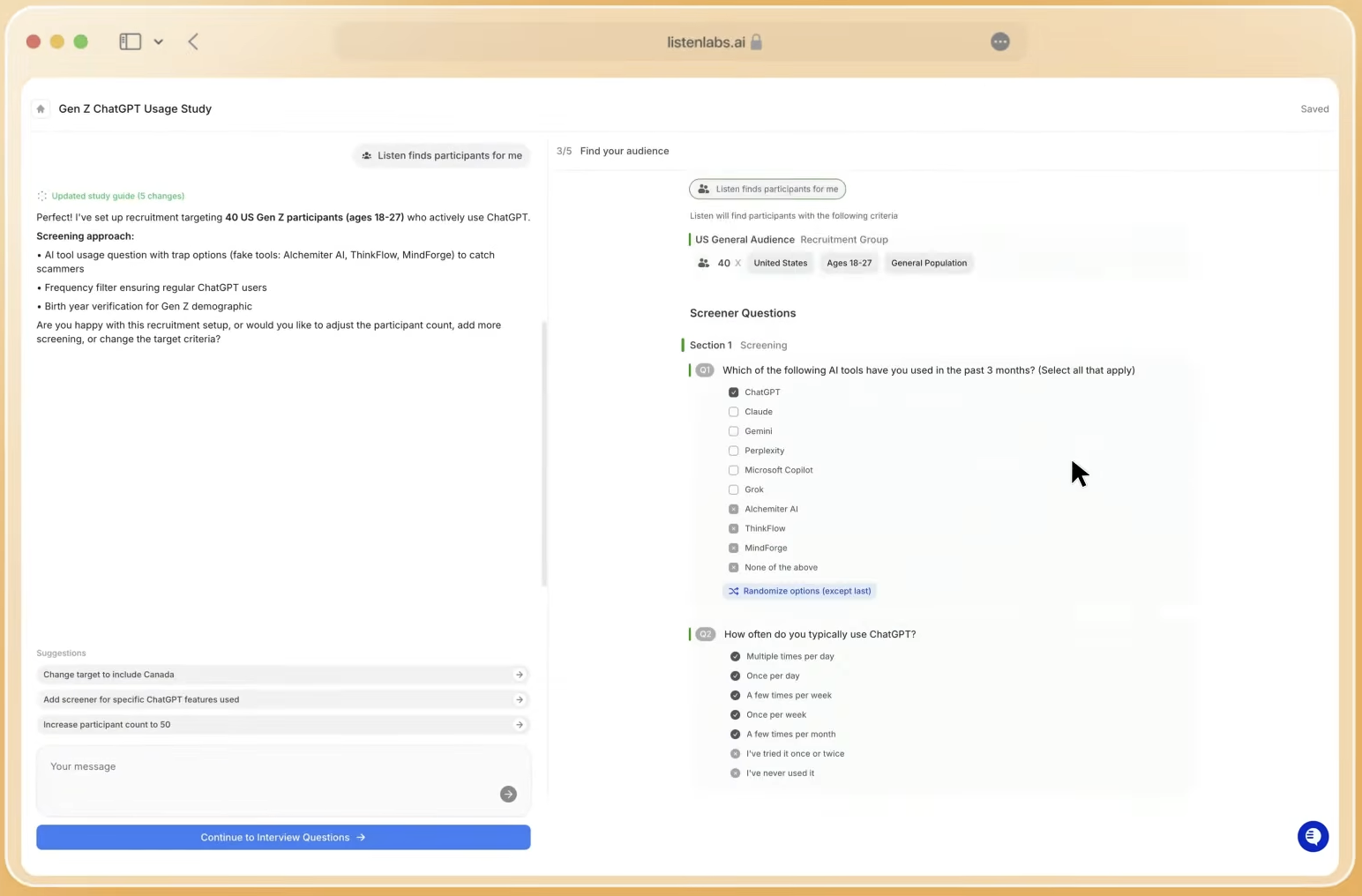
Perplexity, NotebookLM, ChatGPT, and Claude share a structural gap: none can source a single real participant. They provide no recruitment infrastructure, no panel network, and no mechanism for screening or verifying respondents. A VP of Consumer Insights who pastes a discussion guide into ChatGPT still owns the entire recruitment problem, then must stitch outputs across vendors like Prolific, User Interviews, or Respondent.
The fraud problem compounds this gap. Pew Research Center found that widely used online opt-in sources contained approximately 4% to 7% bogus respondents, who systematically skew purchase intent, brand preference, and willingness-to-pay metrics upward. For qualitative research specifically, the problem intensifies. Industry estimates place fraud rates between 10% and 30% of panel-based qualitative participants. This contamination is non-linear. A study with 15% fraudulent respondents does not produce findings that are 85% accurate, because false patterns propagate through theme identification and frequency counts. Free AI tools offer no way to mitigate any layer of this risk.
Listen Labs approaches recruitment as a core system, not an afterthought. Listen Atlas, its AI orchestration layer, matches participants using behavioral and intent data, not only self-reported demographics, across a global network of 30 million verified respondents in 45+ countries. Quality Guard monitors every interview in real time for fraud, low-effort responses, and repeat respondents. A three-studies-per-month cap removes professional survey-takers. A dedicated recruitment operations team supports hard-to-reach segments such as enterprise decision-makers, healthcare workers, and audiences below 1% incidence rate.
Moderation and Emotional Depth: Text-Only Tools Fall Short
The previous section focused on who enters your study. The next challenge concerns what you can actually learn from them. Free AI tools operate on text input only. They cannot hear a participant’s voice, observe a facial expression, or register the pause before someone says “I guess I’d buy it.” A human moderator hears hesitation and notices a glance away when asked about price, while a text-based AI sees only the words.
Reducing layered human experience to single sentiment labels flattens nuance and skews population-level takeaways. Mixed signals such as “I love the concept, but it’s confusing to use” often receive a neutral label even when emotional weight clearly leans negative. LLMs are optimized for fluent language generation, not rigorous source validation. That design choice drives hallucinations even in small datasets of just 12 responses.
Listen Labs’ Emotional Intelligence analyzes three signal layers: tone of voice, word choice, and subconscious micro-expressions. This multimodal view surfaces emotions that transcripts alone miss. Built on Ekman’s universal emotions framework, every emotion is quantified per question and concept, with each label traceable to the exact timestamp, verbatim quote, and AI reasoning. Teams apply this capability to creative testing, concept comparison, usability testing, and brand research across 50+ languages.
Data Quality, Fraud Controls, and Scale
Free tools impose no participant frequency limits, apply no behavioral monitoring, and maintain no reputation scoring across sessions. AI agents now pass thousands of standard attention checks with 99.8% accuracy, which makes many traditional fraud detection methods ineffective on their own. An estimated 30–40% of survey data is compromised by bots, duplicate respondents, and professional survey-takers who game attention checks.
Listen Labs’ Quality Guard applies real-time monitoring across video, voice, content, and device signals. Its reputation scoring compounds across every interview conducted on the platform. As more clients run studies, audience quality improves, creating a flywheel competitors cannot easily replicate. Ninety-two percent of participants in Listen Labs studies report top comfort levels, and 32% explicitly say they feel less judged with AI moderation. Higher comfort directly supports more honest, detailed responses.
Analysis Workflow and Deliverables: From Raw Data to Decisions
Researchers spend most of their time in analysis. They hunt for patterns, quantify insights, test significance, add macro context, and then repackage everything for stakeholders who each need something different. Free LLMs can help with synthesis, but they introduce hallucination risk, positional bias toward early responses, and no traceability back to source material.
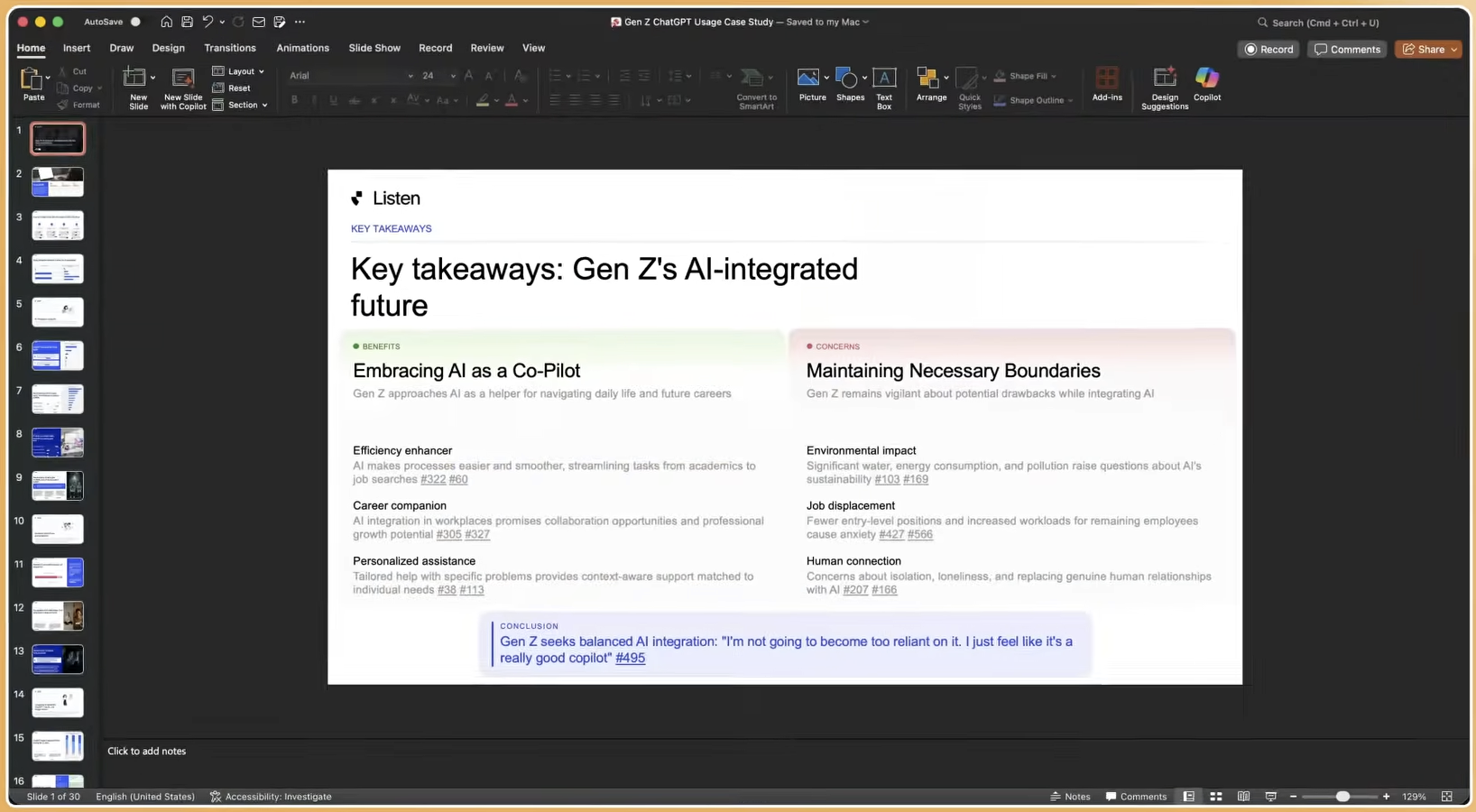
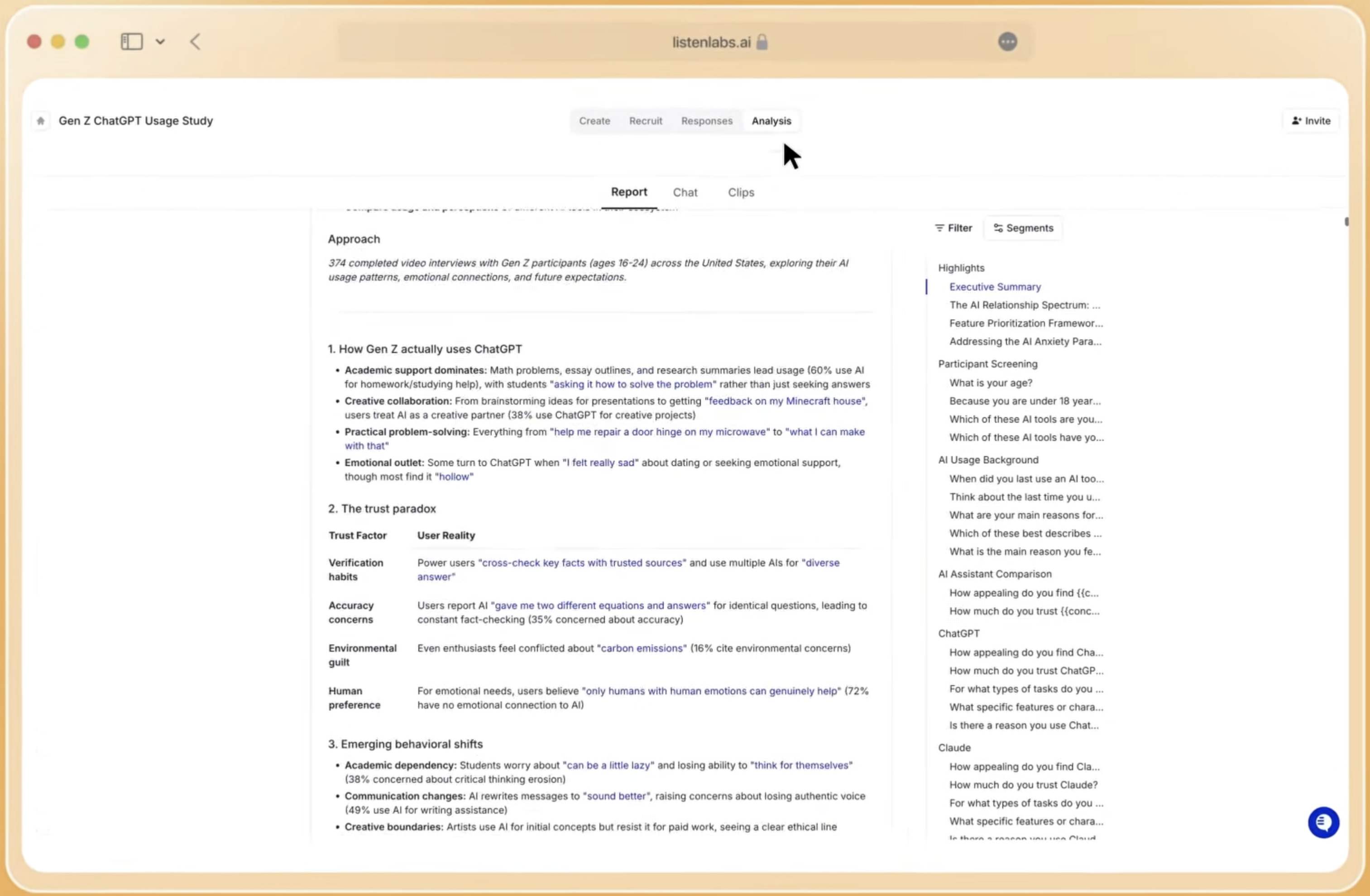
Listen Labs’ Research Agent manages the full analysis workflow from raw data to final output. It generates automated key findings, themes, and personas. It supports chat-based analysis in natural language. It also produces slide decks, memos, highlight reels, and statistical comparisons. One researcher ran a full buying intent analysis across three user segments in under a minute. Every insight links back to the underlying response data, which closes the traceability gap that makes free-tool synthesis risky for high-stakes decisions.
Cross-Study Knowledge and Operational Load
Beyond single-study analysis, enterprise research teams face a second challenge: making past findings accessible and actionable. Generic AI tools produce siloed outputs. Each ChatGPT session, each NotebookLM notebook, and each Claude conversation exists in isolation. No shared layer supports cross-study querying, trend tracking, or institutional knowledge accumulation. Teams repeatedly re-investigate the same questions because past findings sit in slide decks and individual memories.
Listen Labs’ Mission Control functions as the organization’s source of truth for everything learned from customers across all studies. Teams query past research in seconds, track sentiment over time, and build a compounding knowledge base where each new study increases the value of all previous ones. This shift marks the operational difference between a point solution and a true research platform.
Where Free Tools Break for Enterprise Customer Research
Free AI tools hit predictable breaking points when used for enterprise customer insights.
- Participant sourcing: No recruitment infrastructure, no panel, no screening, and no fraud prevention.
- Emotional intelligence: Text-only or document-based tools cannot capture tone, micro-expressions, or hesitation. A 2026 Stanford HAI persona study found that LLM-simulated personas show strong sycophancy bias and converge on majority opinions in ways that diverge sharply from real survey respondents.
- Enterprise security: Free tiers of general-purpose LLMs do not carry SOC 2 Type II, ISO 27001, ISO 27701, or ISO 42001 certifications that Fortune 500 procurement requires.
- Turnaround time: Without integrated recruitment, moderation, and analysis, assembling results from free tools and disconnected vendors takes days or weeks. Always-on discovery became the modal cadence at 38% of product teams in 2026, which created demand for 24-hour turnaround that fragmented workflows cannot meet.
When Free Tools Work and When Listen Labs Becomes Essential
Free AI tools still handle a narrow set of tasks well. They can draft a discussion guide, summarize a small set of pre-collected transcripts, or generate initial hypotheses before a study launches. They fit when no real participants are needed, when emotional nuance is not a priority, and when the output remains internal and low-stakes.
Listen Labs becomes essential when the research objective requires real participants at scale, emotional depth, fraud-screened data, or results within 24 hours. Microsoft used Listen Labs to collect global customer stories for its 50th anniversary celebration within a day. Anthropic surfaced churn drivers from 300+ user interviews in 48 hours, which ran about five times faster than prior methods. P&G completed 250+ interviews with quantified themes that directly shaped product and brand strategy in hours. Skims validated campaign direction with thousands of premium consumers overnight. Robinhood identified user segments driving 2.4x higher weekly re-engagement through qualitative interviews that revealed experience patterns free tools could not surface.
Running Global Programs with Compliance and Consistency
Enterprise customer insights programs must perform consistently across markets, languages, and regulatory environments. Listen Labs supports 100+ languages for interview moderation with automatic translation and transcription. It covers 45+ countries across the Americas, Europe, APAC, and MEA. The platform maintains GDPR, SOC 2 Type II, ISO 27001, ISO 27701, and ISO 42001 certifications. Enterprise SSO is available, and customer data is never used for AI model training.
Enterprises are increasing AI budgets in 2026 but concentrating spend on fewer vendors. They are shifting away from fragmented experimentation toward unified platforms that deliver measurable ROI. A platform that handles recruitment, moderation, analysis, and delivery within a single governance framework reduces vendor risk and simplifies compliance review.
Risks of Relying on Free AI Tools for Insights
Risks from free AI tools extend beyond missing features. End-to-end LLM approaches with strict prompts carry higher hallucination risk and weaker traceability than retrieval-augmented pipelines that use knowledge graphs and source grounding. A study comparing 117 real participant interviews with 90 LLM-generated synthetic interviews found that synthetic outputs miss disengagement, refusals, outliers, and tool-specific friction, even when the overall thematic shape appears correct.
Compromised survey data with 30% inauthentic responses that skew positive can turn a reported 73% interest finding into roughly 60% among real customers. That gap can misdirect investments such as a $2 million feature development program. Free tools provide no mechanism to detect or prevent this outcome.
Decision Checklist: Free Tool or Listen Labs?
The checklist below helps teams decide when free tools suffice and when Listen Labs is required.
- Need real, verified participants rather than synthetic or pre-collected data → Listen Labs required.
- Need emotional signal capture beyond transcript text → Listen Labs required.
- Need results within 24 hours for a product, campaign, or pricing decision → Listen Labs required.
- Operate under SOC 2, GDPR, or ISO requirements for research data → Listen Labs required.
- Run studies across multiple languages or markets at the same time → Listen Labs required.
- Need stakeholder-ready deliverables, including slide decks, highlight reels, and stat tests, without manual formatting → Listen Labs required.
- Build an ongoing research program that depends on cross-study knowledge management → Listen Labs required.
If none of these conditions apply, such as drafting a screener or summarizing three existing transcripts, a free tool may work for that isolated step. The full customer insights workflow, however, calls for a purpose-built platform.
Frequently Asked Questions
How quickly can Listen Labs deliver results compared with free AI tools?
Listen Labs compresses the entire research cycle to less than 24 hours. That cycle includes study design, recruitment, moderation, analysis, and deliverable generation. Traditional qualitative research often takes 4–6 weeks, and enterprise processes can stretch timelines to 6 months. Free AI tools do not include recruitment or moderation, so even if synthesis runs quickly, the surrounding workflow remains slow. Listen Labs handles every step within a single platform, and its Research Agent generates slide decks, memos, and highlight reels in under a minute from completed interview data.
Where do free AI assistants fail on participant quality and fraud prevention?
Free AI assistants provide no participant sourcing capability. They cannot recruit, screen, verify, or monitor respondents. When researchers pair free tools with commodity panels, they inherit the fraud risk of those panels, including the high fraud rates and advanced bots discussed earlier. Listen Labs counters this risk through three layers: a 30-million-person verified respondent network, Quality Guard real-time behavioral monitoring across video, voice, content, and device signals, and a three-studies-per-month participant frequency cap that removes professional survey-takers.
Can free tools capture emotional signals that transcripts miss?
No. Free AI tools process text only. They cannot analyze tone of voice, detect micro-expressions, or register the pause before a participant answers. This limitation matters because what people say and what people feel often diverge. A participant may rate a concept positively while showing confusion or flat affect throughout the interview. Only multimodal analysis captures that gap. As detailed earlier, Listen Labs’ Emotional Intelligence combines tone, word choice, and micro-expressions to reveal these differences and highlight emotionally significant moments.
How does Listen Labs support multilingual global studies at scale?
Listen Labs supports 100+ languages for interview moderation with automatic translation and transcription. Its respondent network spans 45+ countries across the Americas, Europe, APAC, and MEA. The AI moderator conducts interviews in the participant’s language, and the Research Agent synthesizes findings across languages into unified deliverables. A dedicated recruitment operations team manages geographic and demographic targeting for hard-to-reach segments in any market, including audiences below 1% incidence rate.
What enterprise security and compliance standards does Listen Labs meet?
Listen Labs holds SOC 2 Type II, GDPR, ISO 27001, ISO 27701, and ISO 42001 certifications. All data is encrypted at 256-bit, and customer data is never used for AI model training. Enterprise SSO is supported. These certifications cover information security management, privacy information management, and AI management systems, which together match the requirements of Fortune 500 procurement and legal review. Free tiers of general-purpose AI tools do not carry equivalent certifications and are not appropriate for research involving proprietary customer data or regulated industries.
Conclusion: Choosing a Workflow, Not Just a Tool
Free AI research assistants such as Perplexity, NotebookLM, ChatGPT, and Claude work well for isolated tasks like drafting questions, summarizing small transcript sets, or generating early hypotheses. They break when applied to the full customer insights workflow. They cannot source participants, prevent fraud, capture emotional signals, meet enterprise security requirements, or deliver results within 24 hours. Listen Labs has run over 1 million AI-powered customer interviews for companies including Microsoft, Perplexity, and Sweetgreen, shrinking a 4–6 week process to less than 24 hours across every stage of the research lifecycle.
For enterprise teams running continuous customer insights programs, the real choice sits between a fragmented, fraud-exposed, emotionally shallow workflow and an end-to-end platform built for depth, scale, and speed. Listen Labs occupies that second category.